Why we do not slow down Rtorrent 16 at startup: measurements
We restarted Rtorrent 16 with sessions of 500, 2,000 and 10,000 torrents and recorded connection attempts during the first ten minutes of each measurement.
At startup, the client can start many connection attempts within a short time. Tracker announces return peer addresses, and rtorrent then attempts to connect to them. If this activity causes problems on your connection, the three settings below let you adjust it on your NAS.
- 41,000connection attempts in the first 10 seconds of the measurement, with 500 public torrents and the public tracker list disabled, in a test where no peer connection was established.
- 60,672connection attempts in the busiest 10-second interval with 2,000 or 10,000 public torrents.
- 3,076connection attempts in the first minute of a separate test with 16 real-world public torrents and the public tracker list disabled.
Does it come from our side? Yes. libtorrent attempts to connect to the addresses it receives without pacing them. Rtorrent 16's open-file limit of 65,536 leaves room for up to 60,672 pending connections. The same rtorrent binary with a minimal configuration and QTS's limit of 1,024 open files peaked at about 670 pending connections. So it could also reach far fewer peers at once.
What happens when Rtorrent 16 starts
Rtorrent 16 runs rtorrent and libtorrent 0.16.28. Four steps decide what your router sees after rtorrent restarts.
Each torrent announces as soon as it resumes
rtorrent loads its saved session and resumes torrents that were previously active. Each sends an announce to its first available tracker. If that tracker does not respond within 3 seconds and other trackers are available, rtorrent queries one tracker in each remaining group.
It attempts to connect to the returned addresses
Rtorrent 16 requests 100 peer addresses from each tracker for a public torrent and 50 for a private torrent. When a torrent has fewer connections than its configured minimum, rtorrent attempts to connect to the returned addresses, up to a maximum of 200 for a public torrent or 100 for a private torrent. Pending connections count toward that maximum. New attempts are not paced by a separate rate limiter. The global socket limit described below constrains the total number of pending connections.
Unanswered connection attempts time out after 60 seconds
rtorrent allows up to 60 seconds to establish a peer connection. During this period, the NAS retransmits TCP SYN packets. On our test NAS running Linux 6.6, it sent ten SYN packets to an unresponsive address, including the initial packet.
The limit is the number of open sockets
Rtorrent 16 raises rtorrent's open-file limit to 65,536. On our test NAS, this left up to 60,672 sockets available for peer connections. Every peer connection, pending or established, uses one socket. So this limit also sets how many peers rtorrent can download from and seed to at once.
How we measured it
We tested restarts with 500, 2,000 and 10,000 seeding torrents on a QNAP NAS with an Intel Core i5-1235U, 16 GB of RAM and QTS 6.1. We used the rtorrent binary from package 16.27-14E with the rtorrent.rc prepared for version 16.27-14G (rc/rtorrent-next.rc in the archive). The client, test tracker and sampler ran in an isolated network namespace with no route to the internet. No packets from this test reached the public internet.
Event hooks were replaced with no-op stubs that exited immediately. The measurements exclude the execution of the actual hook scripts. Our tracker returned up to 200 peer addresses per announce, depending on how many the client requested. Four out of five addresses did not respond, while one out of five rejected connection attempts. No peer connection was established. With the public tracker list enabled, each torrent had 16 extra trackers in 4 groups, all of them served by the test tracker.
The sampler recorded connection-attempt counters, pending connections, SYN packets, tracker announces and UDP packets roughly once per second. A connection attempt is a new outgoing TCP connection, minus the TCP connections of HTTP announces. All times count from the start of the measurement: the sampler started 1.5 seconds before rtorrent. The public tracker list was disabled unless stated otherwise for a particular configuration.
- 500 torrents
- 2,000 torrents
- 10,000 torrents
| Torrents | All initial announces received (s) | Start of peak 10-second interval (s) | Maximum connection attempts in 10 s | Peak connection-attempt rate (attempts/s) | Peak simultaneous pending connections | Total connection attempts in 10 min |
|---|---|---|---|---|---|---|
| 500 torrents | 1.7 | 1 | 41,000 | 14,979 | 33,000 | 41,000 |
| 2,000 torrents | 2.7 | 1 | 60,672 | 14,570 | 58,362 | 164,000 |
| 10,000 torrents | 17 | 15 | 60,672 | 20,725 | 59,930 | 601,323 |
- Rtorrent 16, public torrents, public tracker list enabled (default)
- Rtorrent 16, public torrents, list disabled
- Rtorrent 16, private torrents
- Same rtorrent binary, minimal configuration, open-file limit: 1,024
| Configuration | 500 torrents | 2,000 torrents | 10,000 torrents |
|---|---|---|---|
| Rtorrent 16, public torrents, public tracker list enabled (default) | 41,000 | 60,672 | 60,672 |
| Rtorrent 16, public torrents, list disabled | 41,000 | 60,672 | 60,672 |
| Rtorrent 16, private torrents | 25,000 | 60,672 | 55,773 |
| Same rtorrent binary, minimal configuration, open-file limit: 1,024 | 805 | 809 | 672 |
- Rtorrent 16, public torrents, public tracker list enabled (default)
- Rtorrent 16, public torrents, list disabled
- Rtorrent 16, private torrents
- Same rtorrent binary, minimal configuration, open-file limit: 1,024
| Configuration | 500 torrents | 2,000 torrents | 10,000 torrents |
|---|---|---|---|
| Rtorrent 16, public torrents, public tracker list enabled (default) | 1.7 | 2.8 | 18.9 |
| Rtorrent 16, public torrents, list disabled | 1.7 | 2.7 | 17 |
| Rtorrent 16, private torrents | 1.7 | 2.9 | 36.8 |
| Same rtorrent binary, minimal configuration, open-file limit: 1,024 | 1.6 | 1.9 | 10.7 |
A lower time in this table means only an earlier announce, not a better configuration. The last row, with QTS's limit of 1,024 open files, peaked at about 670 pending connections. With 10,000 torrents it made 6,819 connection attempts in 10 minutes, against 601,323 for Rtorrent 16. Fewer connections at once means fewer peers to download from and to seed to. A large seeding archive then seeds only part of its torrents at a time.
With 10,000 public torrents and the public tracker list disabled, the busiest 10-second interval contained 60,672 connection attempts. The highest recorded number of connections waiting for a response simultaneously was 59,930. The tracker had received every torrent's initial announce by 17 seconds into the measurement. We recorded 601,323 connection attempts over ten minutes; new attempts follow as unanswered ones time out.
What a router and a provider see
A router with connection tracking maintains state for connections, including those waiting for a response. A large number of simultaneous attempts can increase the load on that table. In the lab, the NAS sent ten SYN packets to one unresponsive address within a minute, including the initial packet. In the test with 2,000 torrents, the maximum number of SYN packets sent to such addresses exceeded 300,000 within a 10-second interval.
In a separate test with 16 public Linux torrents, a live internet connection and the public tracker list disabled, we recorded 3,076 outgoing TCP connection attempts in the first minute of the measurement, including those to HTTP trackers. The peak rate was 947 attempts per second. The highest number of connections waiting for a response simultaneously, 1,449, was recorded at 65 seconds. The torrents were added to a new session, with downloads capped at 2,048 KiB/s and uploads at 512 KiB/s. The smaller numbers do not show that answering peers alone made the difference: the number of torrents and other conditions were different too.
A user on our forum reported that their ISP disconnected their connection while Rtorrent 16 was running, and that connectivity returned only after the router's MAC address changed. We cannot change an ISP's network policies.
Why we do not slow down startup
Download and seeding performance and private tracker support are Rtorrent 16's highest priorities. Adapting to network restrictions and supporting public torrents have a lower priority. A startup queue delays the torrents waiting in it each time rtorrent restarts.
For scale, initiating the same 60,672 attempts at a fixed rate of 500 attempts per second would take about 2 minutes. Initiating 601,323 attempts at that rate would take about 20 minutes. These figures are calculated from the recorded attempt counts; they are not measurements of startup or download times with a rate limiter enabled.
We therefore retain this behavior in the default configuration. The settings below let you adjust connection activity on a NAS whose network requires tighter limits.
What to change if startup traffic disrupts your connection
We tested three settings with 2,000 public torrents. In the baseline configuration with the public tracker list enabled, the busiest 10-second interval contained 60,672 connection attempts. The changes affected the peak count and the ten-minute total differently.
Disable the public tracker list
Open Settings → Connection and enable Advanced. Set Add public trackers to new public torrents to Off, then save. This applies to torrents added from that point onward. In the test with 2,000 torrents, the peak count remained at 60,672 attempts in 10 seconds. The ten-minute total fell from 423,190 to 164,000. In the separate test with 16 real-world torrents, we recorded 3,282 attempts in the first minute with the list enabled and 3,076 with it disabled.

Settings → Connection with Advanced enabled: Add public trackers to new public torrents set to Off, before Review & save. Request fewer peers for public torrents
Open Settings → Connection profiles, enable Advanced and choose Custom. Reduce Public: peers each tracker is asked for and max under Public profile: peers per torrent, for example to 30 and 50 respectively. Each torrent then requests 30 peer addresses from a tracker instead of 100. With 2,000 torrents and the public tracker list disabled, the peak remained at 60,000 attempts in 10 seconds. The ten-minute total fell from 164,000 to 60,000.

Settings → Connection profiles with Advanced enabled, showing the defaults (not the example 30 and 50): public torrents 40 to 200 peers, 100 requested from each tracker. Limit the open sockets
With Advanced enabled, add the following line under Settings → Advanced → Extra rtorrent.rc lines. Press Review & save and confirm. rtorrent reads the setting the next time it starts.
network.max_open_sockets.set = 4096
With the public tracker list disabled and a limit of 4,096 sockets, the peak count fell from 60,672 to 4,475 attempts in 10 seconds. At most 3,715 connections were waiting for a response simultaneously. With a limit of 1,024 sockets, the peak was 803 attempts in 10 seconds and at most 666 connections were pending. This limit caps every simultaneous connection, not attempts per second. Your torrents then reach fewer peers at once to download from and to seed to. With 10,000 torrents, 4,096 sockets give less than one connection per torrent. A large seeding archive then seeds only part of its torrents at a time. Use this limit only if your ISP cuts your connection. The lab had no answering peers, so we did not measure the effect on download speed.
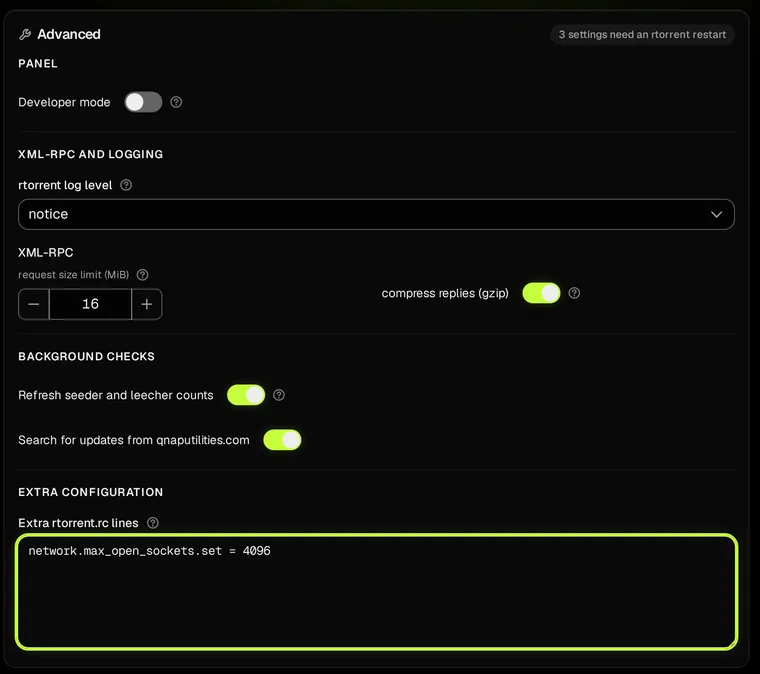
Settings → Advanced → Extra rtorrent.rc lines, with the line that limits the open sockets.
- default (list enabled)
- list disabled
- list disabled, 30 requested, max 50
- list disabled, 4,096 sockets
- list disabled, 1,024 sockets
| Configuration | Maximum connection attempts in 10 s | Peak simultaneous pending connections | Maximum SYN packets to unresponsive addresses in 10 s | Total connection attempts in 10 min |
|---|---|---|---|---|
| default (list enabled) | 60,672 | 60,181 | 311,546 | 423,190 |
| list disabled | 60,672 | 58,362 | 309,256 | 164,000 |
| list disabled, 30 requested, max 50 | 60,000 | 48,000 | 306,116 | 60,000 |
| list disabled, 4,096 sockets | 4,475 | 3,715 | 25,221 | 37,421 |
| list disabled, 1,024 sockets | 803 | 666 | 4,536 | 6,453 |
In our test, reducing the open-socket limit produced the largest reduction in the peak number of connection attempts.
Reproduce the test on a test NAS
The archive contains the published measurements: samples recorded roughly once per second, announces logged by the test tracker, and run summaries. It also includes the test harness source code.
start-lab/README.md explains the setup and commands. Supply the rtorrent binary from the package you want to test. The runs make tens of thousands of connection attempts: run them as root on a test NAS, following the instructions in the archive, never on a NAS that serves your home.